








Kaabo Mantis 8 User Guide
Section Navigator
Know what you need? Ride straight to it.

Introduction
The Kaabo Mantis 8 series is built for everyday riders who want high performance in a compact, agile form. Whether you’re commuting through city streets or enjoying weekend rides, the Mantis 8 offers the perfect balance between power, portability, and control.
There are two models in the Mantis 8 lineup:
Kaabo Mantis 8 – Equipped with a single motor, ideal for efficient city commuting.
Kaabo Mantis 8 Pro – Features a dual motor setup, delivering extra torque and acceleration for steeper climbs and more demanding rides.
Both models are designed with Kaabo’s signature folding frame, responsive suspension, and powerful braking systems. The Mantis 8 is perfect for riders who want performance without the bulk of larger scooters.
Product Diagram

Safety Instructions
This section is crucial for your safety and the longevity of your electric scooter. Please read and understand all the safety instructions before your first ride. Jerung Wheels will not be held responsible for any damage, injury, or legal issues resulting from misuse or neglect of these safety guidelines.
General Safety Guidelines


Do Not Ride in Rainy Conditions
Water can damage electrical components and increase the risk of slipping. Always ride in dry weather.Avoid Self-Repairs
Attempting repairs without proper knowledge may lead to electric shock or further damage. Always consult authorized technicians. If your electric scooter is misbehaving, please send it to our award winning Jerung Medic after-sales service centre.Obey Local Traffic Laws
Respect local regulations regarding electric scooter usage, including speed limits and allowed zones.No Stunts or Acrobatics
This scooter is built for commuting, not tricks. Performing stunts may lead to serious injury.One Rider Only
Never allow more than one person to ride the scooter at a time.Wear Safety Gear
Always wear a helmet, gloves, and elbow/knee pads for protection during your ride.Practice Before Riding on Roads
Start in an open, obstacle-free area to get comfortable with the electric scooter before venturing into traffic.Adjust Handlebar Height
If you have an adjustable pole, ensure the T-bar is adjusted to a comfortable height to maintain control and avoid injury.Charge Before First Ride
Fully charge the electric scooter before using it for the first time to optimize battery performance.Never Power Off While Riding
Turning off the electric scooter mid-ride can result in loss of control.Avoid Large Steps or Curbs
Do not attempt to climb steps higher than 3 cm, as this could cause tipping and injury.Mind the Temperature
Use and store the electric scooter in environments between -5°C and 50°C for optimal performance and battery life.Monthly Charging for Long-Term Storage
If the electric scooter is unused for long periods, charge it at least once a month to preserve battery health.Avoid Deep Water and Spraying
Do not ride through puddles deeper than 5 cm or expose the electric scooter to direct water spray. This can cause electrical failures.Keep Both Feet on the Deck
Always stand with both feet firmly on the deck while riding to maintain balance and control.
Exceeding local speed limits or ignoring traffic laws can result in injury or legal consequences. Ride responsibly at all times.
Folding & Unfolding
Before hitting the road, it’s important to know how to properly open and fold your Kaabo Mantis 8 electric scooter. Follow these steps to ensure your ride starts and ends smoothly.
Always make sure the folding lock is fully secured before riding. An unlocked mechanism can cause serious accidents.
How to Fold the Kaabo Mantis 8
Unlock the folding latch at the pole to release the locking clamp. Then, lift the clamp and fold the pole. Finally, insert the hook into its slot on the deck.
How to Unfold the Kaabo Mantis 8
Release the hook from the slot on the deck. Then lift the pole until its straight. Secure the clamp by pushing it downwards and lock the latches.
Display & Settings
Your Kaabo Mantis 8 electric scooter may come with one of two types of displays; Kaabo CM06 or LT01. The steps and settings vary depending on which display your unit is equipped with. Select the display in the tab below to see the relevant settings.
Display & Settings (Kaabo CM06)

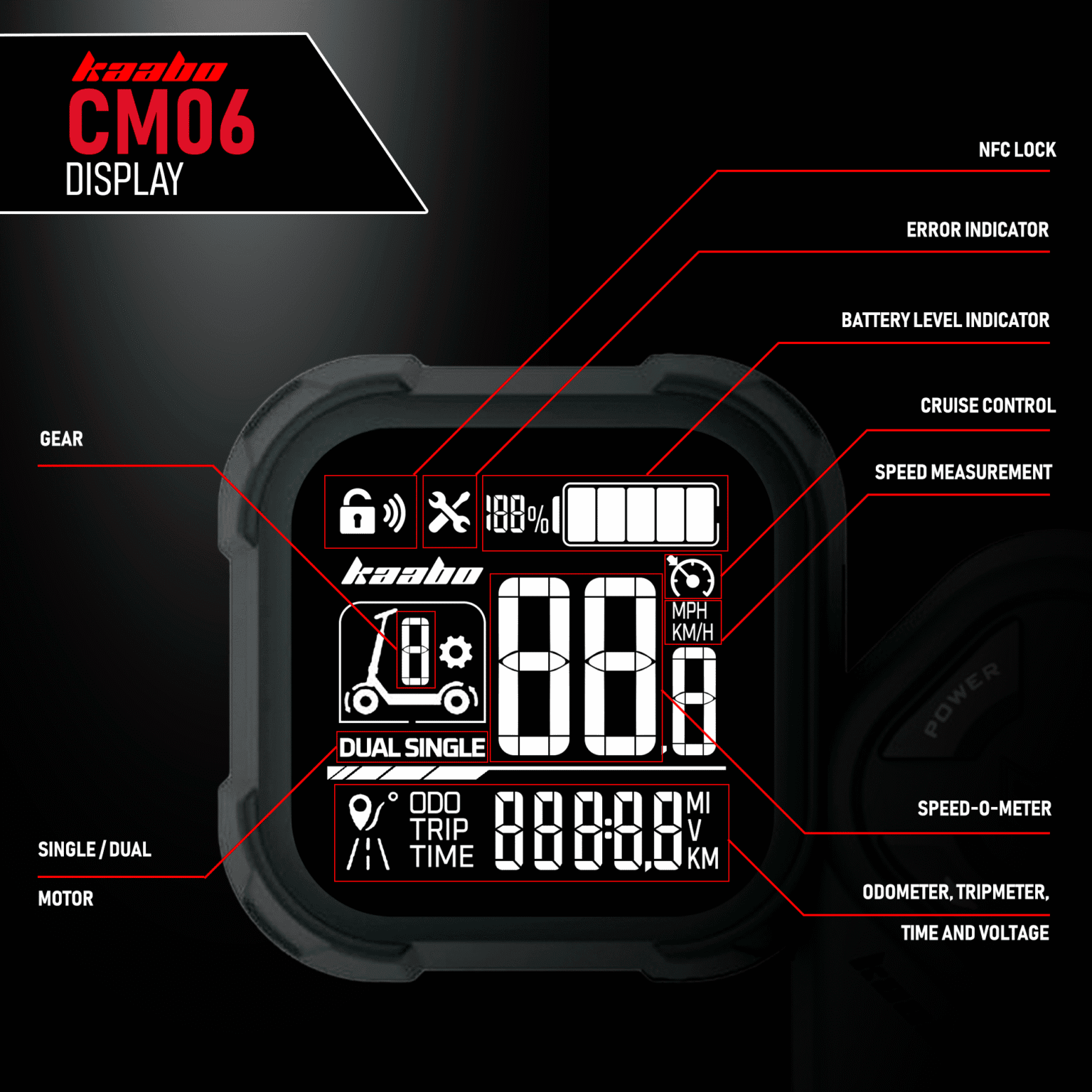
This scooter is equipped with a Kaabo CM06 display throttle. It has a neat monochrome screen to display the necessary information at a quick glance. It is also interchangeable with the LT01 throttle display.
The CM06 display uses a 32mm x 32mm screen that is built using strengthened acrylic, high-definition, high-brightness, full angle viewable IPS VA LCD screen. It also has ergonomic buttons layout for quick and seamless interaction. The display bracket itself is designed to fit ⌀22.2mm diameter handlebars.
Important Note: There are two variants of the Kaabo CM06 throttle, the Kaabo CM06 K1 and Kaabo CM06 K2 that can be identified by the engraving at the back of the display’s casing. The primary differences between these two are:
- The K1 supports up to three gears and the K2 supports up to five gears.
- The K2 has Eco Mode.
- The K2 has single/dual motor display.
- The K2 has Manual option for its Auto Cruise Control setting.
- The K2 has additional P11 setting.
Both of these throttles are NOT interchangeable and you must use the specific model for your electric scooter.
Display Specifications
| Feature | Specifications |
|---|---|
| Power Supply | DC 36V/48V/60V/72V |
| Rated Working Current | 16.5mA (before NFC unlock), 7.78mA (after NFC unlock) |
| Shutdown Leakage Current | <1uA |
| Display | 1.8″ VA LCD display |
| Communication Protocol | UART |
| Operating Temperature | -10ºC ~ 60ºC |
| Storage Temperature | -20ºC ~ 70ºC |
| IP Rating | IP65 |
Display Parameters

Power Button – To turn the electric scooter ON or OFF, press the power button for 3 seconds.
Mode Button – The mode button allows you to toggle through different display parameters when the electric scooter is turned ON. The available parameters are further elaborated below.
/
Up/Down Button – The up and down buttons allows increasing or decreasing values. When in standby mode, pressing the corresponding buttons will increase or decrease the gear.
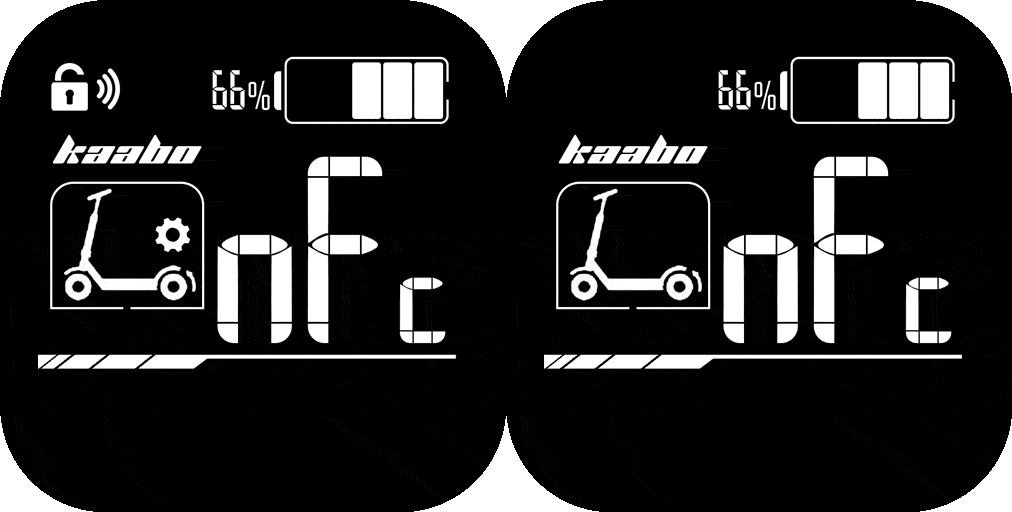
NFC Card – This throttle display support NFC for locking and unlocking. The section between the buttons is the NFC induction area that can be used to unlock the electric scooter. Whenever you see this icon in this user guide, tap the NFC card at the induction area.
NFC indicator – The NFC indicator signals interaction with the NFC tag.
Error indicator – The error indicator shows when the electric scooter needs attention and something is faulty.
Auto Cruise Control indicator – The auto cruise control indicator shows when it is enabled.
/
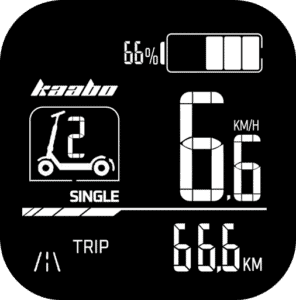
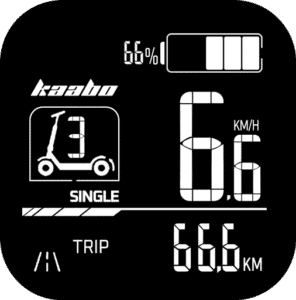
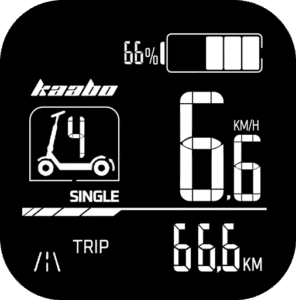
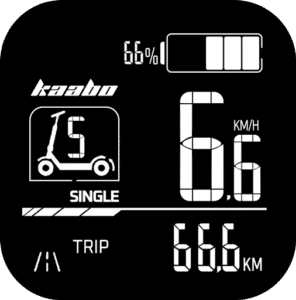
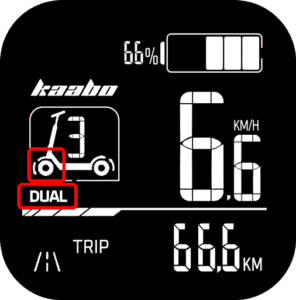
Single / Dual indicator – If your electric scooter supports dual motors configuration, this indicator shows which mode it is currently on.- GEAR – This electric scooter can be switched between three gears. Think of it as a “speed limiter” where gear 1 sets the electric scooter to its slowest speed while gear 3 sets it to the highest speed. Some of the models may allow going up to gear 5. Unlike conventional vehicles where you have to start with the lower gear and shift to the higher one as you move, electric scooters allow you to start with the top gear right away if you want to. You would want to switch to lower gear when you are riding in a busy area and use a higher gear when the street is less crowded.
- Speed-o-meter – The two large digits on the display shows the speed that the electric scooter is cruising at.
- Battery Indicator – The battery indicator shows a rough estimate of the battery level of the electric scooter. Typically, when the battery drops down to the last block, you should be getting ready to recharge the electric scooter.
- Throttle – The throttle stick functions as the electric scooter’s accelerator. It is a variable throttle, which means, the electric scooter’s speed changes according to how deep the throttle is pressed. If the “kick start” mode is enabled (indicated by the “Zero” icon on the display), you will need to give the electric scooter a gentle push to glide before pressing the throttle to get it moving.
Don’t wait for the battery to fully drain. Recharge the scooter when there’s only one or two bars left to help protect the battery and extend its lifespan.
Basic Operation (Kaabo CM06)
Turning On
Long press the
Power Button for 2 seconds to turn on the electric scooter, the display will enter into NFC locked mode.
NFC Unlocking
Long press the
Power Button to turn on the electric scooter, the display will enter into NFC unlocking interface, and the
NFC indicator will blink. Tap the
NFC card at the NFC induction area to unlock the scooter. Once the electric scooter is unlocked, the NFC indicator will disappear.
Password Unlocking
If you forgot to bring your NFC tag with you, you can still unlock your electric scooter using password instead. This is a nifty feature that allows you to continue using even when you don’t have the NFC tag with you.

Long press the
Power Button to turn on the electric scooter, the display will enter into NFC unlocking interface, and the
NFC indicator will blink. Now press the
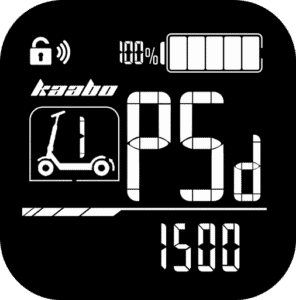
Mode Button to enter the password interface. The default password is 1500. Press the
Up button to increase the value and
Down button to decrease it. Press the
Mode button to move on to the next value. Once the password is entered correctly, the electric scooter will unlock.
For security reasons, always change the default password to something that you can remember.
Changing Gears & Speed Control
The electric scooter has three gears (the K2 variant has up to five gears):


- Gear 1 – Slowest speed
- Gear 3/5 – Maximum speed
To switch between the gears, press the
Up Button to increase and
Down Button to decrease.
Eco Mode

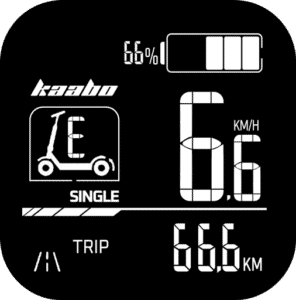
If your electric scooter supports 5 gears, additionally, it will have Eco Mode option that puts the electric scooter into energy saving mode. This will be indicated by the letter “E” in the gear indicator. To enter Eco Mode, keep pressing the
Down Button when you reach gear 1 and the Eco Mode will engage.
Switching Display Modes
While the scooter is turned ON, pressing the
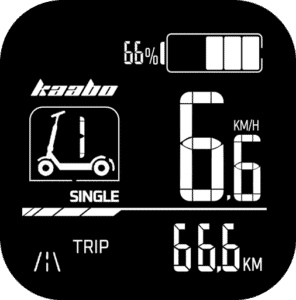
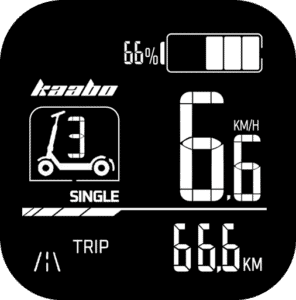
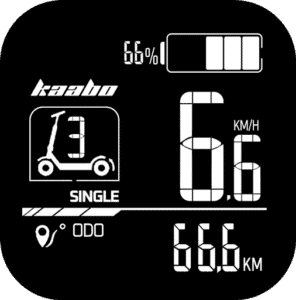
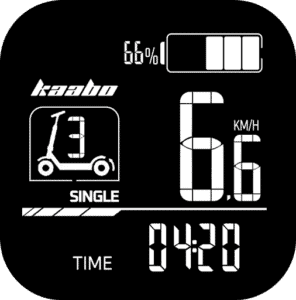
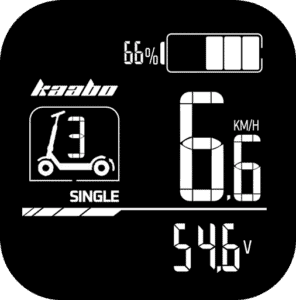
Mode Button cycles through several parameters that gives you a quick glance at necessary information. The modes will cycle between the following:
| Mode | Function |
|---|---|
| TRIP | Displays the distance traveled since the last reset |
| ODOMETER | Indicates the total distance the electric scooter has traveled. |
| TIME | Shows how long the electric scooter has been powered on since the last reset. |
| VOLTAGE | Shows the current battery voltage. |
Reset Trip and Time
The Trip meter and Time since turned on can be reset so you can gauge the time and distance travelled from the point of reset.
To reset them, first let the electric scooter turned on for more than 10 seconds. Now, make sure you’re on the Trip interface as the reset function will only work on this interface. If you’re not in Trip interface, press the
Mode button to switch to it. Now, long press the
Mode button and the Trip icon will blink. Press the
Mode button once again, and now the Trip meter and Time will both reset to zero. You cannot selectively reset either the Time or Trip meter, both of them will reset together.
Single / Dual Motor Modes


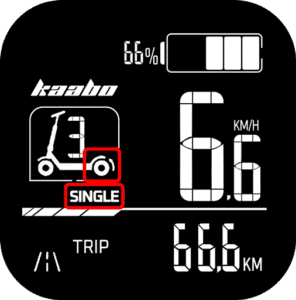
If your electric scooter has dual motor configuration, you can switch between single motor and dual motor seamlessly. By default, the electric scooter will always turn on in single motor mode that spins only the rear wheel. This is shown by
single indicator and a small arrow behind the rear wheel of the electric scooter icon on the display.
To switch to dual motor mode, long press the
Up Button and the dual motor mode will engage. This is shown by
dual indicator and a small arrow in front of the front wheel of the electric scooter icon on the display.
To switch back to single motor, long press the
Up Button again.
Braking State
The electric scooter comes with Electronic Braking System (EBS) that delivers enhanced braking using electronic mechanism. When the brakes are engaged, the controller receives the EBS status signal that cuts off all electronic power supply to the motor and provides feedback to the brake status on the display. In braking state, the arrow(s) near the wheels of the electric scooter icon will blink.
Auto Cruise Control
The electric scooter comes with a built-in Auto Cruise Control feature, designed to maintain a constant speed for smoother long-distance riding. When you hold the throttle at a steady position for approximately 7 seconds, the cruise control will activate automatically. You can now release the throttle, and the scooter will continue moving at the same speed. By default, this feature is turned off for very obvious reasons.
To disengage the auto cruise control, either hit the throttle again, or press the brakes.
Auto Cruise Control is meant for expert riders and should not be enabled otherwise. If you’re not expecting it, this can cause sudden movement without throttle input and cause serious injuries. By default, Jerung Wheels always disable this feature.
There are three different cruise control settings. These modes control how and when cruise control activates, giving you flexibility based on your riding habits. These modes can be selected in the P-settings that are elaborated below in this user guide.
Mode 0 – Auto Cruise Control OFF
In this mode, cruise control is completely disabled. This setting is ideal for new riders or for city riding where constant speed adjustments are necessary. Holding the throttle steady will not activate cruise control in this mode, giving you full manual control at all times.
Mode 1 – Auto Cruise Control Automatic
In this mode, the
auto cruise control indicator is shown on the display and it activates automatically. When you hold the throttle in a fixed position for about 7 seconds, the
auto cruise control indicator will blink continuously to indicate that auto cruise mode has been engaged. You can then release the throttle, and the electric scooter will continue at the same speed until you tap the brake or press the throttle. This mode is best for long, uninterrupted roads where maintaining a constant speed is beneficial.
Mode 2 – Auto Cruise Control Manual
In this mode, auto cruise control is enabled but requires manual activation. This means the feature will not engage automatically and the
auto cruise control icon will not be immediately displayed. Instead, while maintaining a steady speed, you will have to long press the
Down Button to activate the auto cruise control function, upon which only, the
auto cruise control indicator will be shown. At this point, keeping a constant speed will engage the auto cruise control and the
auto cruise control indicator will blink continuously until you tap the brake or press the throttle. This setting offers more control and prevents unintended activation, making it suitable for riders who occasionally use cruise control on longer rides.
Kick Start
The electric scooter includes a Kick Start function, which determines how the motor engages from a standstill.
When Kick Start is ON (enabled by default), the scooter requires a small manual push – such as kicking off with your foot before the throttle becomes active. This is called a non-zero start, and it prevents accidental acceleration from a dead stop.
When Kick Start is OFF, the scooter enters a zero start mode, allowing you to accelerate directly from a complete stop by simply pressing the throttle – no kick-off needed.
For safety, it’s recommended to leave Kick Start ON unless you’re an experienced rider who prefers quick take-offs.
Battery Level Indicator
The display has a handy real-time battery level indicator. The following table shows the battery level indicator and its corresponding available battery power percentage.
| Battery Level (%) | Battery Icon | Description |
|---|---|---|
| 80% and above | ![]() | Full battery; all 5 bars are displayed |
| 60% – 79% | ![]() | Displays 4 bars |
| 40% – 59% | ![]() | Displays 3 bars |
| 20% – 39% | ![]() | Displays 2 bars |
| 10% – 19% | ![]() | Displays 1 bar |
| 5% – 9% | ![]() | No bars displayed |
| Below 5% | ![]() | No bars; battery icon blinks at 1Hz to indicate critically low power |
Basic Settings

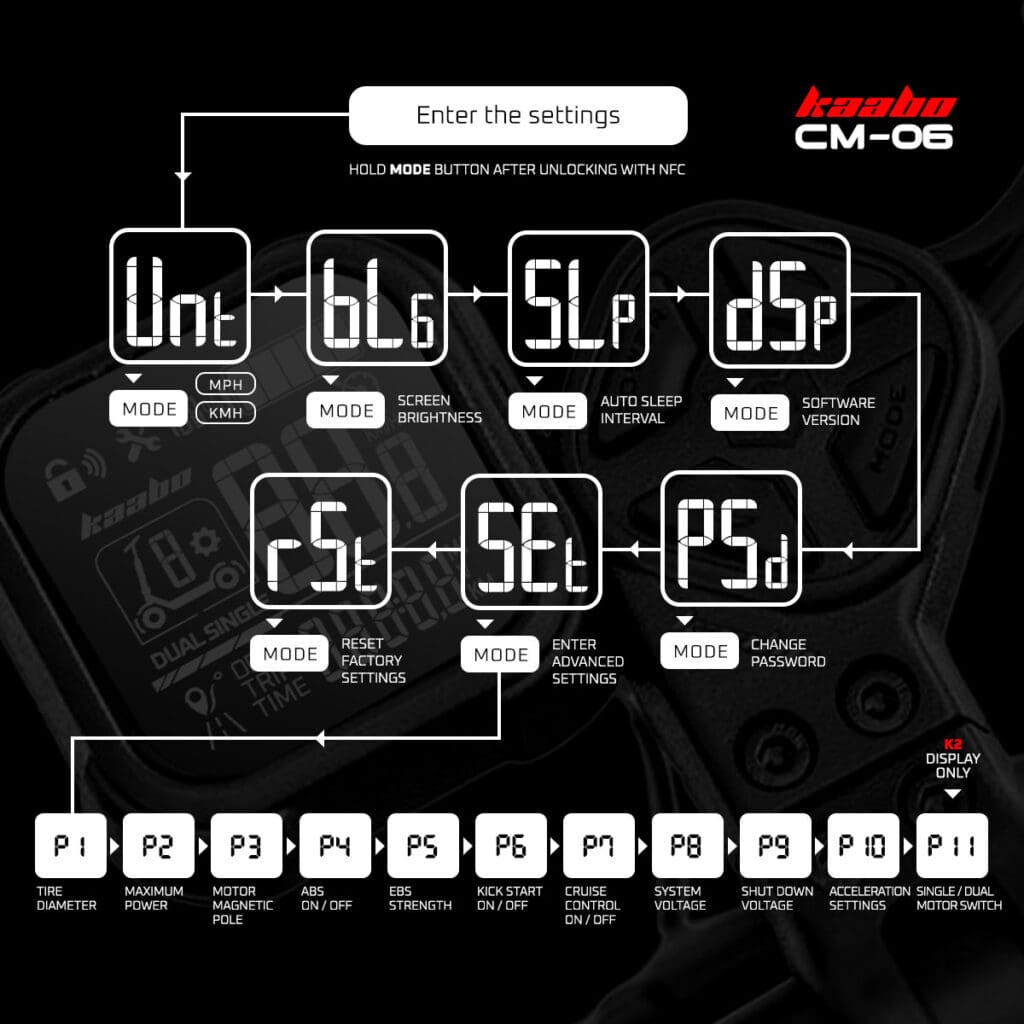
The Kaabo CM06 display throttle includes basic settings that allows tweaking of common settings of the electric scooter and its display. To enter these settings, turn on the electric scooter by long pressing the
Power Button, then within 10 seconds, long press the
Mode Button to enter the settings menu. After that, cycle through the settings by pressing the
Up Botton or
Down Button. To enter the setting, press the
Mode Button and the setting’s parameter will start blinking. During this time, press the
Up Button or
Down Button to alter the values. Once done, long press the
Mode Button to go back to the settings toggle menu. To exit, long press the
Mode Button again. The setting sequence is displayed in the table below:
| Setting | Function |
|---|---|
| UNT | Unit of Measurement
|
| BLG | Display backlight brightness
|
| SLP | Auto Power-off Timer (Sleep Mode)
|
| DSP | Display Software Version
|
| PSD | Change PasswordEnter the new password and it will be saved |
| SET | Advanced Settings (P-settings)Enter advanced settings. You will have to enter the password before going to the P-settings. The P-settings are elaborated further below. |
| RST | Factory Default Settingsn = Do not reset |
P-Settings Guide
The P-Settings menu lets you fine-tune advanced settings for your electric scooter. Always double-check settings before riding. Note that factory default settings might not be accurate to your electric scooter.
How to Access P-Settings (Kaabo CM06)
Here’s a simple video guide on how to access and edit the P-settings on the Kaabo CM06 throttle display.
To access the P-Settings menu on your electric scooter:
After turning on the electric scooter, within 10 seconds, press and hold the
Mode Button for 2 seconds.
This will enter the basic settings menu.Press the
Up Button until you see SET that indicates “Advanced Settings”.
Press the
Mode Button to begin the password entry sequence.- Insert the password to enter the P-settings menu.
The default password is 1500 if it was not changed. Use the
Up Button to increase the value and
Down Button to decrease it. Press
Mode Button to move to the next digit. Once you have entered the password, press the
Mode Button to enter the P-settings. Use the
Up Button and
Down Button to cycle through the P-settings.
Each press switches to the next/previous setting.To select a setting to change, press the
Mode Button.
Then, adjust the value:
Up Button: Increase the value.
Down Button: Decrease the value.
To confirm your setting and return to the P-Settings menu, long press the
Mode Button.
Repeat Steps 4 – 5 to change other settings. To exit P-Settings completely and return to normal riding mode, long press the
Mode Button.
Here’s what each P-setting does:
| P-Setting | Function |
|---|---|
| P1 | Tire Diameter
|
| P2 | Maximum Power Percentage Limit
|
| P3 | Motor Magnetic Pole Setting
|
| P4 | Anti-lock Brakes System (ABS)
|
| P5 | Electronic Brakes System (EBS) Level
|
| P6 | Kick Start Mode
|
| P7 | Auto Cruise Control
|
| P8 | System Voltage
|
| P9 | Controller Shut-Down Voltage Automatically adjusts the system shut down voltage based on the P8 setting. |
| P10 | Acceleration Settings
|
| P11 | Single/Dual Motor Switch (K2 displays only)
|
Make changes only if you understand each option, as incorrect settings may affect performance or safety.
NFC Pairing (Kaabo CM06)
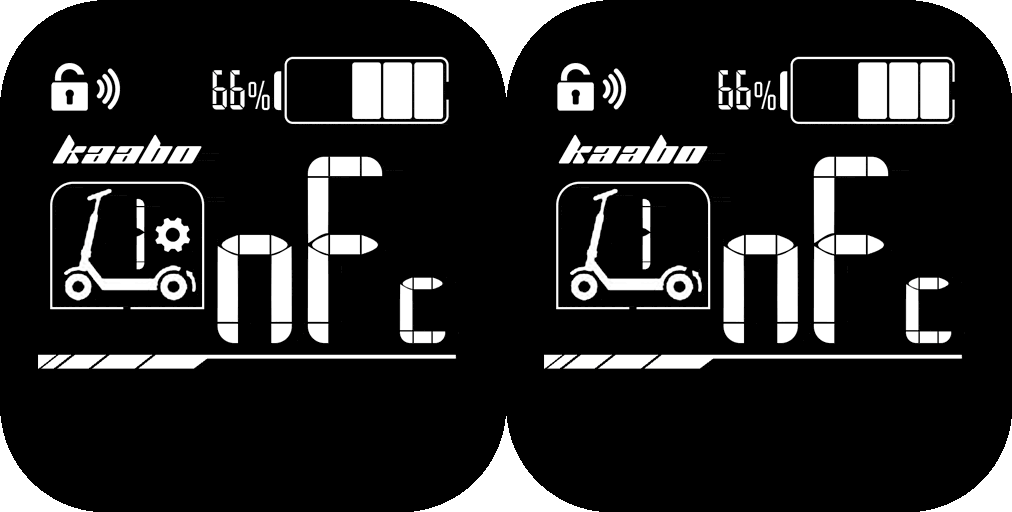
Up to 5 pieces of NFC tags can be paired to the electric scooter. It is encouraged reset the throttle to factory default settings before pairing new NFC tags as adding new ones does not wipe the older tags. Please refer to the Basic Settings section for resetting. In order to pair NFC tags, the electric scooter must be turned on and unlocked using existing NFC card or Password first. Once you have done that, just follow these steps to pair NFC tags:


- Long press the
Up Button,
Down Button and
Mode Button simultaneously. You will now see “NFC” displayed with the cog icon blinking. - Now press the
Mode Button and the
NFC indicator will also blink, while the number “1” disappears. - Now tap the NFC tag at the NFC induction area until you see “1” and the
NFC indicator stops blinking. - Repeat steps 2 – 3 for additional NFC tags. If you’re done with the pairing, long press the
Mode Button to exit NFC pairing mode.

Display & Settings (LT01)

This scooter is equipped with an LT01 display throttle. It has a beautiful color screen to display the necessary information at a quick glance. It also has a Type-A USB port on the side that adds the convenience of charging your devices while on the go.
Display Parameters
Power Button – To turn the electric scooter ON or OFF, press the power button for 3 seconds.
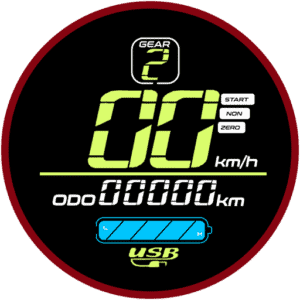
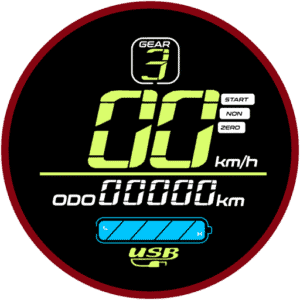
Mode Button – The mode button allows you to toggle through different display parameters when the electric scooter is turned ON. The available parameters are further elaborated below.- GEAR – This electric scooter can be switched between three gears. Think of it as a “speed limiter” where gear 1 sets the electric scooter to its slowest speed while gear 3 sets it to the highest speed. Unlike conventional vehicles where you have to start with the lower gear and shift to the higher one as you move, electric scooters allow you to start with the top gear right away if you want to. You would want to switch to lower gear when you are riding in a busy area and use a higher gear when the street is less crowded.
- Speed-o-meter – The two large digits on the display shows the speed that the electric scooter is cruising at.
- Battery Indicator – The battery indicator shows a rough estimate of the battery level of the electric scooter. Typically, when the battery drops down to the last block, you should be getting ready to recharge the electric scooter.
- Throttle – The throttle stick functions as the electric scooter’s accelerator. It is a variable throttle, which means, the electric scooter’s speed changes according to how deep the throttle is pressed. If the “kick start” mode is enabled (indicated by the “Zero” icon on the display), you will need to give the electric scooter a gentle push to glide before pressing the throttle to get it moving.
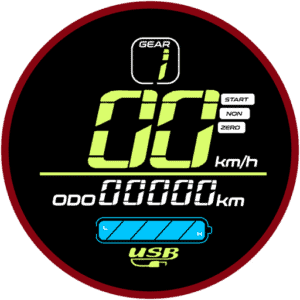
Don’t wait for the battery to fully drain. Recharge the scooter when there’s only one or two bars left to help protect the battery and extend its lifespan.
Basic Operation (LT01)
Changing Gears & Speed Control
The electric scooter has three gears:


- Gear 1 – Slowest speed
- Gear 2 – Medium speed
- Gear 3 – Maximum speed
To switch between the gears, first, press the
Power Button. This will cause the gear number on the display to flash. While it is flashing, press the
Mode Button to cycle through your preferred gear. To stop the gear from flashing, you can either press the
Power Button again, or leave it for 2 seconds and it will stop flashing automatically.
Switching Display Modes
While the scooter is turned ON, pressing the
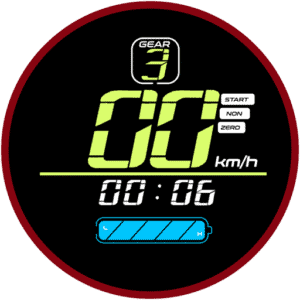
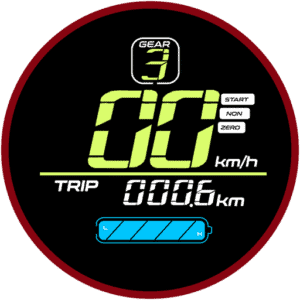
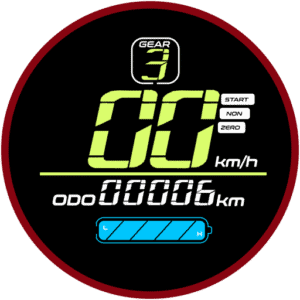
Mode Button cycles through several parameters that gives you a quick glance at necessary information. The modes will cycle between the following:
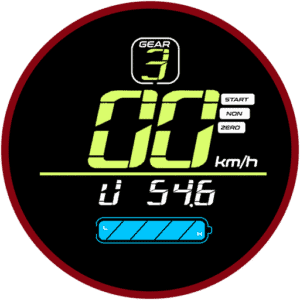
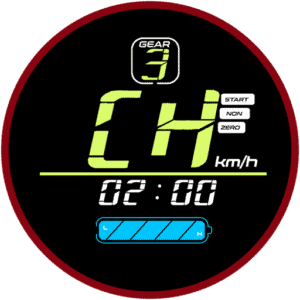
| Mode | Function |
|---|---|
| TIME | Shows how long the electric scooter has been powered on. Resets every time the electric scooter is turned on. |
| TRIP | Displays the distance traveled since you turned the scooter on. Resets every time the electric scooter is turned on. |
| ODOMETER | Indicates the total distance the electric scooter has traveled. |
| VOLTAGE | Shows the current battery voltage. |
| CH 2:00 | Charging mode. Keeps the electric scooter powered ON for 2 hours (overrides auto shut-off setting) so you can use the display’s USB port to charge devices like your phone. |
P-Settings Guide
The P-Settings menu lets you fine-tune advanced settings for your electric scooter. Always double-check settings before riding. If you’re unsure, stick with the factory defaults to keep your electric scooter performing at its best.
How to Access P-Settings (LT01)
Here’s a simple video guide on how to access and edit the P-settings.
To access the P-Settings menu on your electric scooter:
Press and hold the
Power Button and
Mode Button simultaneously at the same time for 2 seconds.
This will open the advanced settings menu.Insert the password to enter the P-settings menu.
The default password is 1500. Use the
Mode Button to increase the value and
Power Button to move to the next digit. Once you have entered the password, long press the
Power Button to enter the P-settings.Use the
Mode Button to cycle through the P-settings.
Each press switches to the next setting.To select a setting to change, press the
Power Button.
Then, adjust the value:
Mode Button: Increase the value.
Power Button: Decrease the value.
To confirm and return to the P-Settings menu, wait 2 seconds.
To exit P-Settings completely and return to normal riding mode, wait another 3 seconds or press the
Mode Button and
Power Button simultaneously again.
Here’s what each P-setting does:
| P-Setting | Function |
|---|---|
| P0 | Tire Diameter Sets the wheel size in inches. This helps the display calculate speed and distance accurately.
|
| P1 | Controller Shut-Down Voltage Sets the minimum voltage at which the controller cuts off power to protect the battery.
|
| P2 | Motor Magnetic Pole Setting Defines the number of magnetic poles in the motor. This affects speed reading accuracy.
|
| P3 | Speed Signal Selection Adjusts how the controller reads the speed signal.
|
| P4 | Unit of Measurement Switch between kilometers and miles for distance and speed display.
|
| P5 | Kick Start Mode Choose how the throttle responds:
|
| P6 | Cruise Control Enable or disable cruise control. If enabled, when cruising at the same speed for 7 seconds, the cruise control will be activated and the electric scooter will continue gliding at the set speed. Hitting the throttle or the brakes will cancel the cruise control operation.
|
| P7 | Initial Acceleration Sets how aggressive the initial take-off is. This adjusts the torque of the electric scooter:
|
| P8 | Electronic Brakes System (EBS) Turns electronic braking on or off. EBS uses electronic signals to control braking force, offering enhanced safety and braking performance in combination with the disc brakes.
|
| P9 | Maximum Power Percentage Limit Sets a limit to the maximum power in percentage. This setting alters the overall performance of the electric scooter, useful if you would like to tame the electric scooter performance for less experienced riders.
|
| PA | Odometer Reset Only usable at factory level for Quality Control (QC) purposes. |
| PB | Auto Power-Off Timer Sets how many minutes the electric scooter stays on when idle before turning off automatically.
|
| PC | Display Brightness Adjusts the brightness level of your display:
|
Make changes only if you understand each option, as incorrect settings may affect performance or safety.
Lighting & Alerts
The Kaabo Mantis 8 electric scooter includes basic lighting and an alert system to help you ride safely and stay visible.
Headlight, Deck Light & Taillight – Use the
Light Switch on the handlebar to turn the lights on or off. Always switch it on when riding at night or in low-light conditions to see and be seen. The rear light automatically shines brighter when braking to warn people nearby. The Kaabo Mantis 8 has bright blue LED lights on the sides of the deck for improved visibility.
Turn Indicators – Press the
Left Indicator Button or
Right Indicator Button to turn on the signal lights. The auxiliary lights on the sides of the deck will blink accordingly until their respective buttons are pressed again to turn them off.
Horn – Press the
Horn Button to sound the horn and alert pedestrians, vehicles, or other riders. Use it responsibly to avoid unnecessary disturbance.
Take The First Ride
How to Ride Your Kaabo Mantis 8 Electric Scooter Safely
Before hitting the road, take time to get comfortable with your electric scooter in a safe, open area. Follow these steps to start your first ride with confidence.
Starting Your Ride
Power On:
Press and hold the
/
Power Button until the display turns on.Kick to Start:
Place one foot firmly on the front of the deck. Push off with your other foot to get moving.
Tip: The Kaabo Mantis 8 electric scooter uses Kick-and-Go mode by default — the throttle only works once the scooter is rolling.Use the Throttle:
Once you’re moving, gently pull the accelerator to increase speed. Lean your body slightly forward for balance as you gain speed.Both Feet On Deck:
Place both feet securely on the deck once you’re moving at a steady pace.
Practice your first rides in a quiet spot until you feel confident controlling the throttle, brakes, and balance.
Choose A Safe Practice Area
Always practice in a flat, open space that’s free from obstacles, traffic, or slippery surfaces. This helps you learn to balance, steer, and control speed safely.
Braking Safely
To slow down, release the throttle and gently pull the brake lever.
Always brake gradually to avoid sudden stops that could wear out the tires or cause you to lose balance.
Remember: The rear light will glow brighter when braking to alert people behind you.
Parking
When you stop:
Power off your electric scooter by long pressing the
/
Power Button.Use the kickstand to keep it upright on flat ground.
Charging the Electric Scooter
Charge your electric scooter when the battery level is low. Do not let the battery drain completely; this helps maintain battery life and performance. The proper sequence of charging is as follows:
Plug the charger to the wall socket first and turn it on.
Check if the LED indicator on the charger has turned green. This indicates that the charger is in standby mode. If the LED is flashing or shows red color, do NOT use the charger as it might be faulty.
Finally, plug in the charger plug into the charging socket of the electric scooter. The LED will now turn red indicating charging sequence.
The LED will automatically turn green once the charging is completed.
Daily Maintenance
Battery Care & Tips
The electric scooter uses a high-quality lithium battery that can be recharged up to 1,000 cycles.
Always plug in the charger to the wall socket first before plugging it into the electric scooter. If the charger is faulty, do not, at any cost, try to plug it in.
Keep your battery fully charged. Lithium-ion batteries have a longer lifespan if they’re charged rather than empty. If you went out riding and still have plenty of charge left, just plug it in and let it charge to full again. Do NOT leave your electric scooter with low battery level.
If you won’t use your electric scooter for a long time, charge it at least once a month to maintain battery health.
Do not leave the charger plugged in for too long (weeks or months) after the battery is fully charged.
- Over time, your battery will experience degradation. This does not necessarily mean that your battery is spoilt. It just means that it requires recalibration and balancing. Jerung Wheels highly recommend you to do this process at least once a year or 1500km whichever comes first. Bring it to our experts at Jerung Medic to get this done. Do NOT attempt it yourself as these batteries are extremely dangerous if handled improperly.
Keep Your Electric Scooter in Top Shape
Regular maintenance keeps your electric scooter safe, smooth, and performing at its best. Follow these simple tips to extend its lifespan.
Lubrication
Re-lubricate the mechanically moving parts every six months to keep its operation smooth.
Avoid using WD-40 or general-purpose sprays — use proper lubricants suitable for electric scooter parts.
Tyres
Check your tires regularly for wear, cracks, or punctures.
Make sure your tires are properly inflated if they’re pneumatic. This helps maintain ride comfort and safety.
Replace worn or damaged tires promptly.
- You can find replacement tyres & tubes for your electric scooter and schedule for installation with our Jerung Medic if necessary here.
Brakes
Test your brakes before each ride.
If braking feels weaker or takes longer, adjust the regulator nut on the rear wheel to fine-tune brake sensitivity. If your electric scooter uses hydraulic brakes, they require brake bleeding to improve the braking performance.
If your brakes are squeaking, you may need to replace the brake pads or the disc caliper might require realignment or replacement.
Get your brakes professionally serviced if needed.
Keep It Clean
Wipe down your electric scooter regularly to remove dust and dirt.
Avoid spraying water directly onto electrical parts. Use foam and dry cloth to clean it instead.
Store your electric scooter in a dry place. Avoid direct sunlight and rain as much as possible.
Always do a quick pre-ride check — test the brakes, lights, horn, and tire condition before hitting the road.
Troubleshooting
If your electric scooter isn’t working as expected, you may check these common points. If none of these seem to fix the problem, please reach out to our Jerung Medic to get them fixed by our trained professional.
My electric scooter won’t power on.
Make sure the battery is charged.
Check the Power Button — press and hold for at least 3 seconds.
Inspect all hubs and connectors for loose or dirty connections.
The display turns on, but my electric scooter won’t move.
Check if the throttle works: remember, the default is Kick Start mode — you must push off before the throttle engages.
Make sure the brake lever isn’t stuck in the engaged position.
The brakes feel weak.
Adjust the rear brake’s regulator nut to improve sensitivity.
Check the brake pads for wear and replace them if needed.
- If your electric scooter uses hydraulic brakes, you may need to bleed them.
The lights or horn don’t work.
Check connections for loose wires.
Ensure your battery isn’t too low — some features may stop working when power is very low.
The battery doesn’t hold charge well anymore.
This may happen if the battery is nearing the end of its life cycle (up to 1,000 charges).
Your battery might need to be recalibrated and balanced. Send it to Jerung Medic to get it fixed.
Error Codes (Kaabo CM06 K1)
Troubleshooting Kaabo CM06 K1 Display Faults on Electric Scooter
If your electric scooter’s display shows an error code, don’t panic — this guide explains what each code means and how to do basic checks yourself.
Always switch off your electric scooter and unplug it before inspecting wires or connections.
If you’re unsure or the fault continues after basic checks, we strongly recommend contacting our Jerung Medic for professional help.
Take clear photos or videos of your display and any wires or parts you check.
| Error Code | Description | Action |
|---|---|---|
| E01 | Wiring related fault code | Troubleshoot |
| E02 | Motor hall sensor fault code. | Troubleshoot |
| E04 | Throttle related fault code. | Troubleshoot |
| E05 | Undervoltage protection fault code. | Troubleshoot |
| E06 | Controller related fault code. | Troubleshoot |
| E08 | Overheat protection fault code. | Troubleshoot |
| E30 | Communication related fault code. | Troubleshoot |
Error Codes (LT01)
Troubleshooting LT01 Display Faults on Electric Scooter
If your electric scooter’s display shows an error code, don’t panic — this guide explains what each code means and how to do basic checks yourself.
Always switch off your electric scooter and unplug it before inspecting wires or connections.
If you’re unsure or the fault continues after basic checks, we strongly recommend contacting our Jerung Medic for professional help.
Take clear photos or videos of your display and any wires or parts you check.
| Error Code | Description | Action |
|---|---|---|
| E06 | Low voltage protection. | Troubleshoot |
| E07 | Motor hall sensor fault code. | Troubleshoot |
| E08 | Throttle related fault code. | Troubleshoot |
| E09 | Controller related fault code. | Troubleshoot |
| E10 | Communication related fault code. | Troubleshoot |